

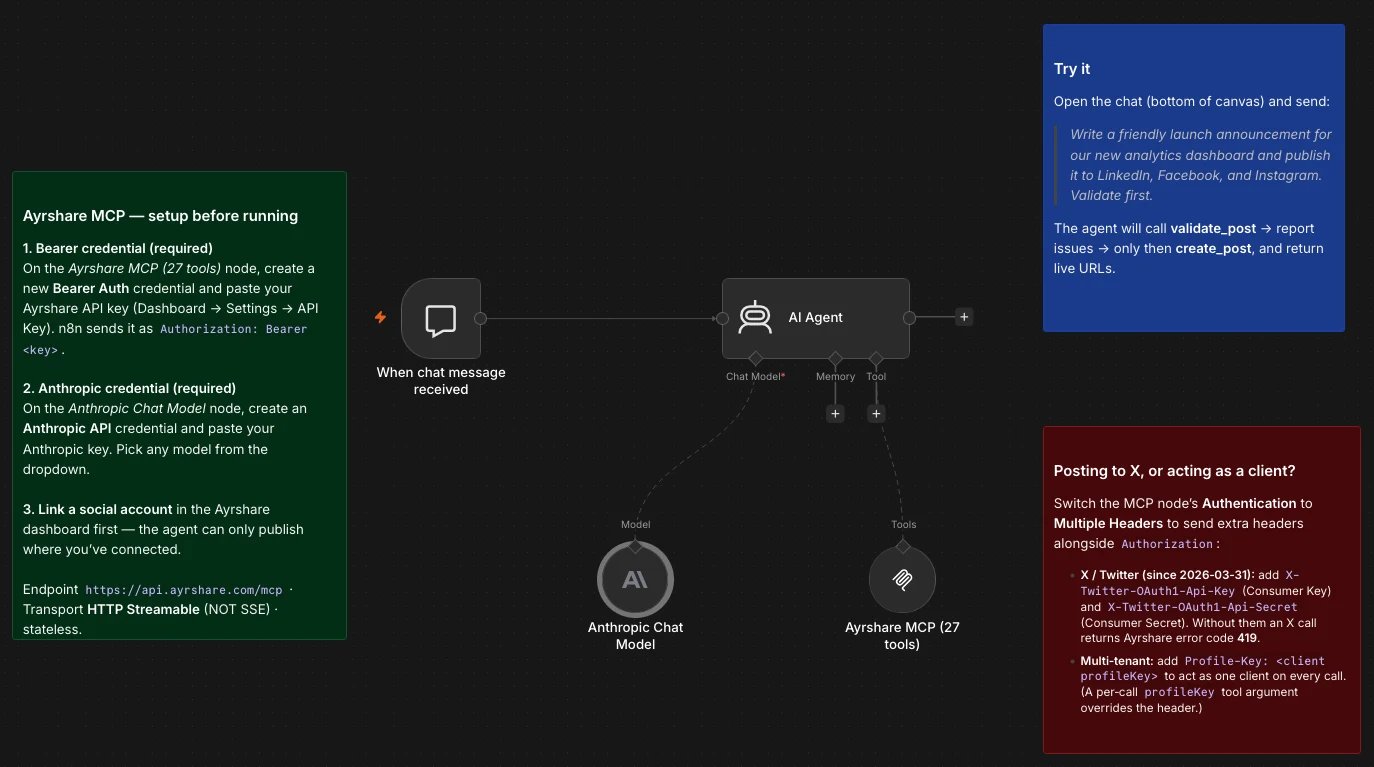
Download the n8n starter workflow
The workflow shown above, ready to import: Chat Trigger, AI Agent, an Anthropic chat model, and the Ayrshare MCP node pre-wired with the validate-first system prompt.
api.ayrshare.com and your model provider.
This guide covers the MCP-first path end to end. If you would rather build a fixed, non-agent workflow, there is a short REST fallback at the end.
Why MCP instead of writing API calls
You can call Ayrshare’s REST API directly from an HTTP Request node, which is fine for fixed, predictable workflows. The MCP Server earns its place when an LLM is in the loop:- The agent picks the tool. Describe the goal (“publish this to our business channels and schedule the follow-up for Tuesday”) and the agent chooses
validate_post,create_post, and the right parameters itself. - Validation before anything goes live.
validate_postdry-runs your content against each platform’s length, format, and media rules, so the agent does not ship a post a network will reject. - One call, many networks. A single
create_postfans out to every linked platform. - Platform changes are Ayrshare’s problem. When a network changes its API, Ayrshare maintains the integration and your workflow keeps working.
- Same rules as the REST API. Every MCP tool call runs in-process through the same Ayrshare API chain: same auth, rate limits, quota, and validation. There is no separate behavior to learn.
How it connects
The AI Agent node is the brain. The MCP Client Tool sub-node attaches to it, connects to the Ayrshare MCP Server athttps://api.ayrshare.com/mcp, discovers the available tools, and exposes them to the agent. When the agent acts, the node dispatches the call to Ayrshare, which publishes to the networks.
Prerequisites
- An n8n instance (Cloud or self-hosted) on a recent version with the AI Agent and MCP Client Tool nodes. The MCP Client Tool node is built in. You do not need a community node, because the Ayrshare server speaks Streamable HTTP.
- An Ayrshare account and API key (Dashboard → Settings → API Key), or start a free trial.
- At least one social account linked in Ayrshare. The agent can only publish where you have connected.
- A chat model credential for the AI Agent node (Anthropic, OpenAI, etc.).
- (Optional) A Business or Enterprise plan if you will manage multiple clients via sub-profiles.
Set up the MCP Client Tool node
1
Add an AI Agent node
Open or create a workflow and add an AI Agent node (under the Advanced AI nodes).
2
Attach the MCP Client Tool node
On the AI Agent node, click the Tool connector and add an MCP Client Tool node. Configure it:
3
Add your Ayrshare key as a Bearer credential
For Credential, create a new Bearer Auth credential and paste your Ayrshare API key as the token. n8n sends it as
Authorization: Bearer YOUR_API_KEY. When you save, n8n connects and lists the 33 tools.4
Wire up the chat model and system prompt
Attach a Chat Model sub-node and select your model credential. Give the agent a system prompt that sets the rules, for example:
You are a social media assistant with access to Ayrshare tools. Before publishing anything, always callvalidate_postfirst and report any issues. Only callcreate_postafter validation passes. Default to the platforms the user names; if none are named, ask. Never invent media URLs; only use URLs the user provides, and confirm them withvalidate_mediawhen in doubt.
5
Add a trigger
For testing, the Manual Trigger or Chat Trigger is easiest. For production, use whatever kicks off the workflow (schedule, webhook, form, new row in a sheet).
Use HTTP Streamable, not SSE. The Ayrshare MCP Server uses the modern Streamable HTTP transport and is stateless. n8n’s SSE option is deprecated, and the server rejects the SSE stream. Always choose HTTP Streamable.
The tool surface
Your agent sees all 33 tools through the one MCP node. You rarely call them by name; you describe intent and the agent selects. The domains are Posts, History, Analytics, Comments, Messages, Profiles, Media, Generate, Webhooks, Ads, and Errors. For the complete list with each tool’s purpose and scope, see the Tool Catalog. Two stand out for safety:validate_post dry-runs a post with the same input as create_post but publishes nothing, and explain_error turns any Ayrshare error code into a plain-English cause and fix, so the agent can self-diagnose.
Example 1: draft, validate, and publish from a chat message
The “hello world” of this integration. Trigger the workflow with a chat message or form, and let the agent do the rest.- Trigger: Chat Trigger (or a Form Trigger with a “what should we post?” field).
- Prompt to the agent: “Write a friendly launch announcement for our new analytics dashboard and publish it to LinkedIn and Facebook. Validate first.”
validate_post with your copy and both platforms; if anything breaks a network’s rules it tells you instead of failing silently; once validation passes it calls create_post and returns the live post URLs. Because validation runs first, you find out about a problem before anything is public.
Example 2: auto-publish new content across your channels
Turn a content source into multi-network posts without touching it.- Trigger: RSS Read node on your blog feed, a webhook from your CMS, or a new row in Google Sheets or Airtable.
- AI Agent step: “Summarize this article into a short social post with 2 to 3 relevant hashtags, then validate and publish to LinkedIn, Facebook, and Threads.”
- Optionally add a human-in-the-loop approval before the
create_poststep so a person signs off.
recommend_hashtags for data-driven tags and generate_post if you want Ayrshare to draft the copy rather than your chat model.
Example 3: weekly analytics digest
Run the loop in reverse: read performance and report it.- Trigger: Schedule node, for example every Monday at 8am.
- AI Agent step: “Pull last week’s account analytics for LinkedIn, Instagram, and Facebook, and summarize the top 3 posts by engagement.”
- The agent uses
get_social_network_analyticsfor account-level numbers andget_post_analyticsfor individual posts, then you pipe its summary to a Slack, Gmail, or Notion node.
Acting on behalf of clients (multi-tenant)
If you manage social for multiple clients, Ayrshare’s profiles let one account post to many separate sets of linked accounts. On a Business or Enterprise plan you have two ways to target a client from n8n:- Per connection: add a
Profile-Keyheader to the MCP Client Tool node (use Multiple Headers auth so you can send bothAuthorizationandProfile-Key). Every call on that node then acts as that client. Good when a workflow serves one client. - Per call: many tools accept a
profileKeyargument, which the agent can set per action. When both are present, the per-call argument wins. Good when one workflow routes across clients.
create_profile and then generate_jwt_social_linking_url to mint a hosted page where the client links their own accounts. No credentials pass through your workflow.
Posting to X/Twitter
In n8n, switch the MCP Client Tool node’s Authentication to Multiple Headers and add the twoX-Twitter-OAuth1-* headers alongside Authorization. It is a one-time setup per Ayrshare account, and the same key pair applies to every profile. For everything else (Facebook, Instagram, LinkedIn, YouTube, TikTok, and the rest) no extra headers are needed. See Connect & Setup → X/Twitter BYO credentials.
Keep a human in the loop
The MCP tools make it trivial for an agent to publish, which is exactly why you should gate it. Two cheap safeguards:- Always validate first. Bake “call
validate_postbeforecreate_post” into the system prompt. Validation publishes nothing and catches platform-rule violations early. - Add an approval step. Insert n8n’s Send and Wait for Response (Slack or email) node between the draft and the publish action so a person approves before anything goes live. For scheduled content, the agent can use
update_postto revise an awaiting-approval post.
REST fallback (no agent)
If you want a fixed, deterministic workflow with no LLM, skip MCP and call the REST API with an HTTP Request node:- Method:
POST - URL:
https://api.ayrshare.com/api/post - Authentication: Header Auth,
Authorization: Bearer YOUR_API_KEY
api.ayrshare.com, not the dashboard host app.ayrshare.com. (app.ayrshare.com will accept API calls, but it is not the documented endpoint and can return intermittent 502/504 gateway errors, so always use api.ayrshare.com.) The same pattern works for the other REST endpoints. This is the right tool when the workflow is fully predictable and you do not need an agent deciding anything.
Troubleshooting
You can also expose the
explain_error tool to the agent so it decodes any Ayrshare error code into a cause and fix on its own.
Next steps
Connect & Setup
Endpoint, transport, authentication, profile targeting, and BYO credentials.
Tool Catalog
The 33 tools grouped by domain, with scope and purpose.
MCP Server
What the MCP Server is and how it maps to the Ayrshare API.
Claude Code Plugin
The same server, packaged for Claude Code.